







Star Wars – Mouse Droid
The MSE-6 repair droid or “mouse droid” manages to be both the ugliest and cutest droid in the Star Wars universe, at the same time. Showing up in A New Hope in just a short scene before skittering away this little guy makes appearances all over the place. This little guy hides a surprise inside, a USB and SD/MicroSD card holder. It’s a very simple glue together make and is a great way to keep your storage media organized.

1 Assemble the Bottom
- P3D_MouseDroidUSB_Bottom_V1
- P3D_MouseDroidUSB_BottomSled_V1
- 2 8mm pieces of 1.75 filament
- These pieces have a front and back!
- The sled has a bumper, that is on front
- The bottom has a less angled (more sheer) surface at the front
- Using the filament as a guide to align the two pieces, glue them together
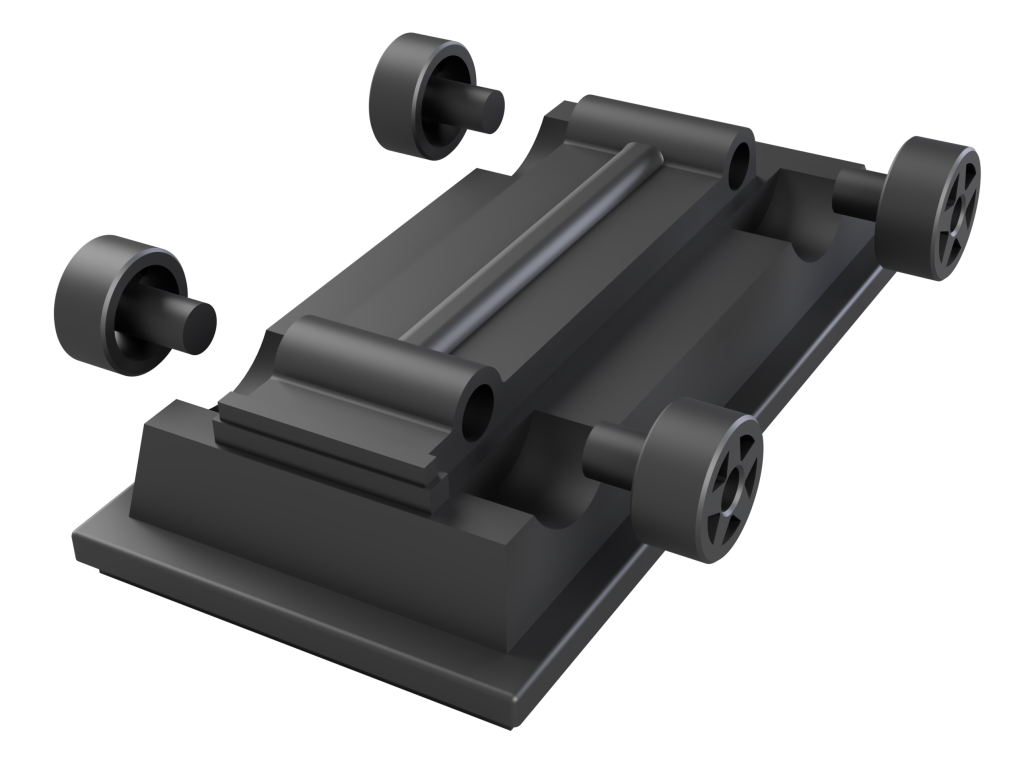
2 Add the Wheels
- P3D_MouseDroidUSB_Wheel_BL_V1
- P3D_MouseDroidUSB_Wheel_FL_V1
- P3D_MouseDroidUSB_Wheel_BR_V1
- P3D_MouseDroidUSB_Wheel_FR_V1
- The rear wheels are larger than the back, I would recommend dry fitting first to make sure
- Glue the wheels onto the sled

3 Attach the Panels
- P3D_MouseDroidUSB_Top_V1
- P3D_MouseDroidUSB_PanelR_V1
- P3D_MouseDroidUSB_PanelL_V1
- Glue the panels to the sides of the top

4. Attach the Top Greebles
- P3D_MouseDroidUSB_FrontTopTop_V1
- P3D_MouseDroidUSB_RearTopTop_V1
- P3D_MouseDroidUSB_FrontTopBottom_V1
- P3D_MouseDroidUSB_RearTopBottom_V1
- P3D_MouseDroidUSB_RearTopMount_V1
- P3D_MouseDroidUSB_RearTopMount_V1
- Glue the 3 top pieces for the front and back together first
- Glue the completed top pieces to the top body

5 Done!
Your mouse droid is ready for display!


